Introduction
Welcome to the official Triton assembly tutorial. Here, you will learn the basics of stack machines (which Triton VM is), as well as non-deterministic programming. Some of these concepts are unusual even to veteran software engineers, so we’ll take things step by step. The tutorial assumes a certain familiarity with and affinity to programming, but if some of the above words don’t mean anything to you right now, that’s totally fine.
The final program this tutorial is building towards is both realistic and useful; the early programs are intentionally simple and might not serve any purpose other than as stepping stones. That’s on purpose: each step isolates one concept so that later programs are easy to read and modify.
This tutorial is an introduction to writing programs for Triton VM, but not on how to develop Triton VM itself. It also doesn’t cover the cool cryptography behind Triton VM’s zero-knowledge proof system; if you’re interested in that, take a look at the specification. Having the specification at hand might be useful in any case, not least of all because it contains a comprehensive overview of all instructions. If that seems somewhat overwhelming right now, don’t worry, we’ll explore things together.
Follow along
One of the best ways to learn is by experimenting. For this reason, you can execute and modify all the programs presented in this tutorial directly in your browser:
push 42
write_io 1
halt
If you want to observe how a program executes step by step, for example because you need to debug something, take a look at the Triton TUI. I mention it here because it’s been very useful to me in the past, but if you’re not familiar with Triton VM yet, it’s probably better to keep reading this tutorial first, then later come back to Triton TUI. I’ll mention it again at the end of the tutorial, so you don’t have to keep that browser tab open.
The Stack
A stack machine is a computer model where instructions read from and write to a stack. The stack is ordered, and the top element is the one each instruction touches first.
In Triton VM, the stack is the data structure that programs interact with constantly. Because it is so central, it’s what we will look at first.
Basic Stack Manipulation
At the start of the program, the stack is empty1.
You can directly add elements to the top of the stack through instruction push.
push takes an immediate argument, like this:
push 3
push 5
halt
To mentally keep track of the current state of the stack, we sometimes use comments like this:
       // _     (← initially, the stack is empty)
push 3 // _ 3   (← the top of the stack is 3)
push 5 // _ 3 5 (← the stack contains 3, then 5 on top)
pop 2  // _     (← the stack is empty once more)
halt
You’ve just seen a new instruction: pop.
Like push, instruction pop also takes an immediate argument.
In this case, the argument specifies how many elements to pop off the stack.
You can pop between 1 and 5 elements at once, anything beyond that is an error.
The following program will be rejected before Triton VM even starts execution:
push 0 push 1 push 2 // _ 0 1 2
push 3 push 4 push 5 // _ 0 1 2 3 4 5
pop 6                // _ 0 (?)
halt
If you try to remove too many elements from the stack, Triton VM will crash:
pop 1 // uh oh!
halt
When the VM crashes you get a bunch of debug information to help you find the issue. If you want to know what the various symbols mean, check out the specification’s chapter on registers. You don’t need that knowledge to go on with the tutorial, though.
Arithmetic
Arithmetic instructions, like add, mul, and eq consume the two elements on top of the stack and push the result.
For example, to compute the sum of 2 and 3, you can:
push 2 push 3 // _ 2 3
add           // _ 5
halt
Types in Triton VM
While we’ve happily manipulated the stack and even done some arithmetic already, we haven’t talked about the type of
the elements on the stack yet.
In order to facilitate the zero-knowledge proof system, Triton VM’s native type is the
finite field that contains 0xffff_ffff_0000_0001 elements.
Because of the way finite fields work, it’s a fair mental model to say that arithmetic always happens modulo this
number.
For example, adding 0xffff_ffff_0000_0000 to 1 gives 0xffff_ffff_0000_0001, which is 0.
This is similar in other languages that let you access numeric types at a low-ish level.
For example, adding Rust’s u64::MAX to 1 also gives 0.2
The only other type that Triton VM has some native support for is u32, i.e., a 32-bit unsigned integer type.
While all elements handled by Triton VM are finite field elements, the set of
“bitwise arithmetic” instructions
crash the VM if the elements they touch do not fall within the interval [0, 0xffff_ffff].
Apart from being useful by themselves, these instructions can be used to guarantee the absence of overflows.
Advanced Stack Manipulation
Sometimes, it’s difficult or even impossible to keep your data organized in such a way that it is always on top of the stack exactly when you need it to be.3 The instructions that re-arrange the stack are the solution to that problem:
picklets you move an element from deeper in the stack to the topplacedoes the opposite, moving the top of the stack to some deeper locationswapexchanges the top of the stack with some element at a deeper location
// set up the stack
push 7 push 6 push 5 push 4 // _ 7 6 5 4
push 3 push 2 push 1 push 0 // _ 7 6 5 4 3 2 1 0

// start manipulating
        // _ 7 6 5 4 3 2 1 0
pick 5  // _ 7 6 4 3 2 1 0 5 (← 5 is now on top, the rest got pushed down)
place 7 // _ 5 7 6 4 3 2 1 0 (← 5 is now at position 7, the rest got moved up)
swap 3  // _ 5 7 6 4 0 2 1 3 (← 0 and 3 have swapped places, the rest remains)
halt
Element Duplication
Often, you’ll need to use some element more than once.
All the instructions we have learned so far either create a hardcoded element, move the element around, or consume it.
The instruction dup lets you duplicate a stack element and pushes it onto the stack.
For example, we can use this to raise some value to the third power:4
push 2 // _ 2
dup 0  // _ 2 2   (← The element at index 0 got duplicated)
dup 1  // _ 2 2 2 (← The element at index 1 got duplicated; here, we could also have done dup 0)
mul    // _ 2 4
mul    // _ 8
halt
Assertions
Triton VM is designed for programs that make sure that certain conditions hold.
Because of this, an important instruction is assert.
This instruction will act like pop 1 if the top of the stack is 1.
If the top of the stack is not 1, executing this instruction will crash Triton VM.
Instruction assert is often paired with instruction eq.
Like the name might suggest, eq checks for equality:
it consumes the two elements on top of the stack, then pushes a 1 if they are equal, and a 0 otherwise:
push 2 push 3 // _ 2 3
mul           // _ 6
push 6        // _ 6 6
eq            // _ 1
assert        // _
halt
Exercise
Let’s apply what we’ve learned so far. Write a program that computes the squares of 2, 3, and 6, then sums those squares. Finally, it should assert that the result equals 49. I’ll get you started:
push 2 // _ 2
push 3 // _ 2 3
push 6 // _ 2 3 6

// your code goes here

push 49
eq assert
halt
If you need a hint, a possible solution waits for you in here.
push 2 // _ 2
push 3 // _ 2 3
push 6 // _ 2 3 6

// start of the solution
pick 2 dup 0 mul // _ 3 6 4
pick 2 dup 0 mul // _ 6 4 9
pick 2 dup 0 mul // _ 4 9 36
add              // _ 4 45
add              // _ 49
// end of the solution

push 49
eq assert
halt
Congrats, you have mastered Triton VM’s stack! In the next lesson, we’ll look at control flow in Triton VM.
-
That’s a lie: Triton VM’s stack has always at least 16 elements on it. The reason has to do with the zero-knowledge proof system and is out of scope for this tutorial. If you are interested in more details, take a look here. In this tutorial, you can just ignore those 16 elements the VM starts with. ↩
-
You need to turn off overflow checks explicitly or crank up optimizations, but the point stands. ↩
-
Apart from the theoretical limitations, it can also be a major hassle to achieve this. ↩
-
Perhaps you’ve already spotted the dedicated
powinstruction. Let’s just pretend we want to usemulinstead – this is about showing offdup, after all! ↩
Routines and Control Flow
In the exercise of lesson 1, you computed the sum of squares of 2, 3, and 6. In this lesson, we keep the same math, but introduce two big ideas:
- reusable code with
call,return, andrecurse - conditional control flow with
skiz
Routines
Suppose we want to square the top stack element many times.1 It’s possible to just repeat the required code in the source code.
pick 10 dup 0 mul
pick 10 dup 0 mul
pick 10 dup 0 mul
pick 10 dup 0 mul
// and so on
halt
However, as you might be aware, copy-and-paste programming
has a number of issues.
Instead of this antipattern, you can use the instruction call and its counterpart return to benefit from routines.
Instruction call jumps to an address and “remembers” both where it jumped from and where it jumped to.2
Executing return will then – surprise! – return the control flow to just beyond the last call executed.
This means that call is more powerful than a simple “go-to”.
When writing Triton assembly, these addresses don’t have to be hardcoded – that’d get annoying fast. Instead, you can introduce labels to your code in the following way:
call my_label  // ╶───╮
halt           //  ←──│───╮
               //     │   │
my_label:      //     │   │
  // do something  ←──╯   │
  return       // ╶───────╯
Note that label declarations are not like scopes in other languages. In the final program, they do not appear at all. The following is totally valid, but probably a bug:
routine_a:
  // do something
              // ← no return

routine_b:
  // do something else
  return
In this program, a call routine_a would execute both the code implied by “do something” and by “do something else”.
Control Flow
Now that you have an idea about how routines work, let’s take a look at conditional execution.
In most programming languages, you have a construct like if condition then { … } else { … }.
Since Triton VM is a stack machine, the condition lives on the stack.
The corresponding conditional instruction has the following behavior:
- if the top of the stack is 0, the next instruction in the program is skipped
- if the top of the stack is not 0, the next instruction in the program is executed
- in either case, the top of the stack is removed
Because the instruction skips if the top of the stack is zero, the instruction is called skiz.
This instruction name is a bit unusual, but that’s on purpose.
It highlights that at most, one instruction is skipped, and also, that it cares about zero / not zero, and nothing else.
Should you have trouble remembering the behavior of skiz, you can substitute the name with if in your mind.
Just be aware that, unlike an if in languages with scope, skiz by itself cannot skip more than one instruction.
To get an if-then-else construct going, we have observed that the following pattern works quite well:
push 0 // this is the condition to branch on

dup 0           // _ condition condition
push 0 eq       // _ condition !condition
swap 1          // _ !condition condition
skiz call if
skiz call else
halt

if:
  pop 1  // remove “!condition” for now
  // do “if” things
  push 0 // put “!condition” back to skip the “else” branch
  return

else:
  // do “else” things
  return
Loops
When executing instruction call, Triton VM not only remembers where it jumped from, but also where it jumped to.
This gives rise to an interesting possibility:
we can jump to that same target again, without changing where return returns to once it executes.
The instruction that lets us do that is called recurse, because… well, it allows for recursion!
Together with skiz and return, the instruction recurse allows to build loops.
           // _
push 101   // _ n
call spin  //  ╶─────╮
halt       //  ←─────│────╮
           //        │    │
// BEFORE: _ n       │    │
// AFTER:  _ 0       │    │
spin:      //  ←─────┴───────────╮
  dup 0    // _ n n       │      │
  push 0   // _ n n 0     │      │
  eq       // _ n (n==0)  │      │
  skiz     // _ n         │      │
    return //  ╶──────────╯      │
  addi -1  // ← new instruction! │
  recurse  //  ╶─────────────────╯
Halt
You’ve met all the important control flow instructions that you need to write complex programs for Triton VM.
One of them hasn’t been introduced yet: halt.
As you might expect, halt marks the end of execution – when Triton VM executes halt, it shuts down gracefully.
Implicitly terminating a program is an error:
push 42
pop 1
// oops, no halt
Exercise
Let’s start generalizing the sum-of-squares from lesson 1 by using a variable number of inputs. While for now, the inputs and the result are still hardcoded, the program becomes more amenable to future changes. I’ll get you started again:
push 2  // _ 2
push 3  // _ 2 3
push 6  // _ 2 3 6

push 0  // _ 2 3 6 0 (← accumulator)
push 3  // _ 2 3 6 0 n (← number of iterations)
call square_and_sum
        // _ 49 0

pop 1   // _ 49
push 49 // _ 49 49
eq assert
halt

// BEFORE:    [input; n] 0 n
// AFTER:     sum_of_squares 0
square_and_sum:
  // your code here
Hint 1
Start the loop body by checking whether you still need to square-and-sum something.Hint 2
Make sure that between iterations, the stack retains the same general shape.Hint 3
A good loop invariant is// _ [input; i] acc i, where i is initially n and counts
down to 0.
Solution
// BEFORE:    [input; n] 0 n
// INVARIANT: [input; i] acc i
// AFTER:     sum_of_squares 0
square_and_sum:
  // are we done?
  dup 0 push 0  // [input; i] acc i i 0
  eq            // [input; i] acc i (i==0)
  skiz return

  // apparently, i != 0, so there are elements left
  pick 2        // [input; i-1] acc i elem
  dup 0 mul     // [input; i-1] acc i elem²
  pick 2 add    // [input; i-1] i (acc + elem²)
  place 1       // [input; i-1] (acc + elem²) i
  addi -1       // [input; i-1] (acc + elem²) (i-1)
  recurse
Great – you now have full control over Triton VM’s flow. In the next lesson, we’ll look at output and the various forms of input, one of which makes Triton VM quite unusual.
-
And all that while still purposefully overlooking instruction
pow– this time, it’s about showing off routines! ↩ -
These addresses are recorded on the jump stack. ↩
Input and Output
So far, we’ve only computed on hardcoded values and didn’t communicate the result at all; everything stayed within Triton VM. In this lesson, we’ll look at the ways in which Triton VM communicates with the outside world: public input, public output, and – possibly most interesting – secret input.
Public Input
A dedicated object for public input, filled with 0 or more elements, can be used to communicate information to Triton
VM.
The instruction to read from public input is read_io.
The instruction read_io takes an immediate argument in the range 1..=5, indicating how many elements should be read.
As you would expect, the read elements are pushed onto the stack.
In the execution environment below, you can specify public input in the “frontmatter”, like so:
+++
public_input = [17, 42]
+++

read_io 2          // _ 17 42
push 42 eq assert  // _ 17
push 17 eq assert  // _
halt
Public Output
The dual to read_io is the instruction write_io.
It also takes an immediate argument, indicating how many elements should be written to the output.
+++
public_input = [17, 42]
+++

read_io 2
write_io 2
halt
Secret Input
One reason Triton VM exists is to generate zero-knowledge proofs of correct execution. Not too many details of this proof system are relevant for this tutorial; what is relevant is that programs need a way to consume private data, i.e., input that is not public. The zero-knowledge proof of correct program execution that can be generated for a Triton program always contains both public input and public output; it never contains secret input.
The instruction for reading secret input is called divine.
Just like its counterpart for public input, instruction divine takes an immediate argument in the range 1..=5,
indicating how many elements should be read and pushed onto the stack.
The name of the instruction is purposefully arcane to highlight the special source of the elements that divine creates
on the stack.
From a program’s perspective, this is a form of non-determinism: since the proof of correct program execution is not tied to secret input in any way, the same program with the same (public) input can behave in different ways;
+++
public_input = []
non_determinism.individual_tokens = [0]
+++
// try changing the secret input     ↑

push 0    // _ 0
divine 1  // _ 0 something_from_secret_in
skiz
  assert  // ← might get executed, depending on secret input
halt
Of course, if you can see or set the secret input yourself, the program is totally deterministic. The name and reasoning exist (and only really make sense) in the context of the zero-knowledge proof system.
RAM
Not only can Triton VM store elements on its stack, it also has “Random Access Memory” available.
There are two main instructions that can access RAM: read_mem and write_mem.
Both take an immediate argument in the range 1..=5, indicating how many elements to read or write.
In both cases, the stack’s top element is taken as the address to read from or write to, the “RAM pointer”.
After any single element is read (or written), the RAM pointer is decremented (or incremented, respectively).
This allows reading and writing long sequences with ease:
+++
public_input = [8, 9]

[non_determinism.ram]
0 = 5
1 = 6
2 = 7
+++

read_io 2   // _ 8 9
push 3      // _ 8 9 write_addr
write_mem 2 // _ (write_addr+2)
pop 1       // _

push 4      // _ read_addr
read_mem 5  // _ 9 8 7 6 5 (read_addr-5)
pop 1       // _ 9 8 7 6 5
write_io 5  // _
halt
You might have noticed that RAM is not initialized to all-zero.
Instead, RAM is another part of what makes Triton VM a non-deterministic virtual machine.
It’s possible to use RAM as the same kind of input that instruction divine gives access to.
In particular, an address that is read from before it is written to holds a non-deterministic value the first time
it is read from.
The second read is guaranteed to return the same value, and an address that’s written to is guaranteed to hold the
written value.
+++
[non_determinism.ram]
0 = 42
+++
// overwrite RAM address 0 with value 0
push 0      // _ 0
push 0      // _ 0 0
write_mem 1 // _ 1
pop 1       // _

// read from RAM address 0
push 0      // _ 0
read_mem 1  // _ ? -1
pop 1       // _ ?

// assert that the read value is, in fact, 0, not 42
push 0      // _ ? 0
eq assert   // _
halt
Non-deterministic RAM is a good way to communicate a lot of data to Triton VM without executing many read_io or
divine instructions.1
Exercise
Let’s revisit the sum-of-squares program from the previous lessons.
In the last lesson, we used various control flow instructions to build a loop instead of repeating code.
With the knowledge of read_io and divine in the toolbox, the program starts becoming more useful.
Write a program that takes 2 elements from public input.
The first argument indicates the number of elements in the sum;
the second element equals the expected sum-of-squares.
The individual elements that are to be squared, then summed, should be supplied via secret input.
The program should assert that the expected value matches the computed value.
A program like this can be used to prove the knowledge of certain information without revealing anything about that
information.
With the specific program you’ll write here, the proof of correct execution will show that the prover knows n values
whose sum of squares equals the claimed result – without revealing what those values are.
Here’s some example input to start you off:
+++
public_input = [3, 49]
non_determinism.individual_tokens = [2, 3, 6]
+++
// your code here
A possible solution could look like this.
+++
public_input = [3, 49]
non_determinism.individual_tokens = [2, 3, 6]
+++
push 0    // _ 0
read_io 1 // _ 0 n
call square_and_sum
pop 1     // _ sum_of_squares
read_io 1
eq assert
halt

// BEFORE: _ 0 n
// AFTER:  _ sum_of_squares 0
square_and_sum:
  dup 0 push 0 eq // _ acc i (i==0)
  skiz return     // _ acc i
  divine 1        // _ acc i x
  dup 0 mul       // _ acc i x²
  pick 2 add      // _ i (acc+x²)
  place 1         // _ (acc+x²) i
  addi -1         // _ (acc+x²) (i-1)
  recurse
-
Although using this form of input for large amounts of data is probably better done when using Triton VM programmatically, not here in your browser. ↩
Hashing
In this last lesson, we’ll take a look at hashing instructions. We’ll round things off with a program that’s a little more relevant than the toy example we’ve used so far, and instead look at proving knowledge of a hash preimage instead.
Hashing
Triton VM has built-in support for the cryptographic hash function Tip5:
the instruction hash consumes the stack’s top 10 elements, hashes them, and pushes the resulting digest onto the
stack.
push 0 push 0
push 0 push 0
push 0 push 0
push 0 push 0
push 0 push 0
hash
write_io 5
halt
Tip5 Sponge
Triton VM also has built-in support for using Tip5 in Sponge mode.
There is exactly one, globally accessible Sponge state.
At program start, it is uninitialized.
The instruction sponge_init initializes the Sponge state, after which the instructions sponge_absorb and
sponge_squeeze perform absorption and squeezing, respectively.
A Signature Scheme
As with any cryptographic hash function, it’s impossible1 to predict Tip5’s input given only its output.
This allows us to build a simple signature scheme using Triton VM.2
Suppose I told you that I knew a secret set of values that hash to
0xc55a3ddcd9428558, 0x8fc09b4e26e7febe, 0xcc6759262fdd9a89, 0x497ec4974f65e527, 0x0d0f6400210565cd
under Tip5.
(Psst: the input is 10 zeros. Don’t tell anyone!)
Now, if a program included a snippet like:
+++
non_determinism.individual_tokens = [0, 0, 0, 0, 0, 0, 0, 0, 0, 0]
+++
divine 5
divine 5
hash
push 14220746792122877272 // == 0xc55a3ddcd9428558
push 10358449902914633406 // == 0x8fc09b4e26e7febe
push 14728839126885177993 // == 0xcc6759262fdd9a89
push 05295886365985465639 // == 0x497ec4974f65e527
push 00941080798860502477 // == 0x0d0f6400210565cd
assert_vector
halt // or a continuation of the program
then only knowledge of the secret set of values (here: a bunch of zeros) allows for error-free execution of the program. A proof of correct execution under Triton VM’s zero-knowledge proof system then means that the creator of the proof knew the secret values at proof creation time. If the secret values are sufficiently random (and sufficiently secret), then this is like a digital signature.
A program using this idea to sign the message “hi world” could look like this:
+++
non_determinism.individual_tokens = [0, 0, 0, 0, 0, 0, 0, 0, 0, 0]
+++
push 100 // ‘d’
push 108 // ‘l’
push 114 // ‘r’
push 111 // ‘o’
push 119 // ‘w’
push  32 // ’ ’
push 105 // ‘i’
push 104 // ‘h’
write_io 5
write_io 3
call sign
halt

// this part is like in the snippet above
sign:
  divine 5
  divine 5
  hash
  push 14220746792122877272
  push 10358449902914633406
  push 14728839126885177993
  push 05295886365985465639
  push 00941080798860502477
  assert_vector
  pop 5
  return
-
more precisely, computationally infeasible ↩
-
It’s a rather inefficient signature scheme at that, but since this is still a tutorial, that’s fine. ↩
Where to Go Next
Congrats! You have completed the tutorial.
You might have noticed that I did not introduce every single one of Triton VM’s instructions. With the knowledge you’ve gained over the last few lessons, you should be able to understand the behavior of any instruction.
If you would like to give some feedback, feel free to open an issue. I’d appreciate your thoughts!
Tools
If you want to debug a program or just take a look at how it behaves at runtime, check out Triton TUI. It’s essentially a step-debugger for Triton VM, right in your terminal.
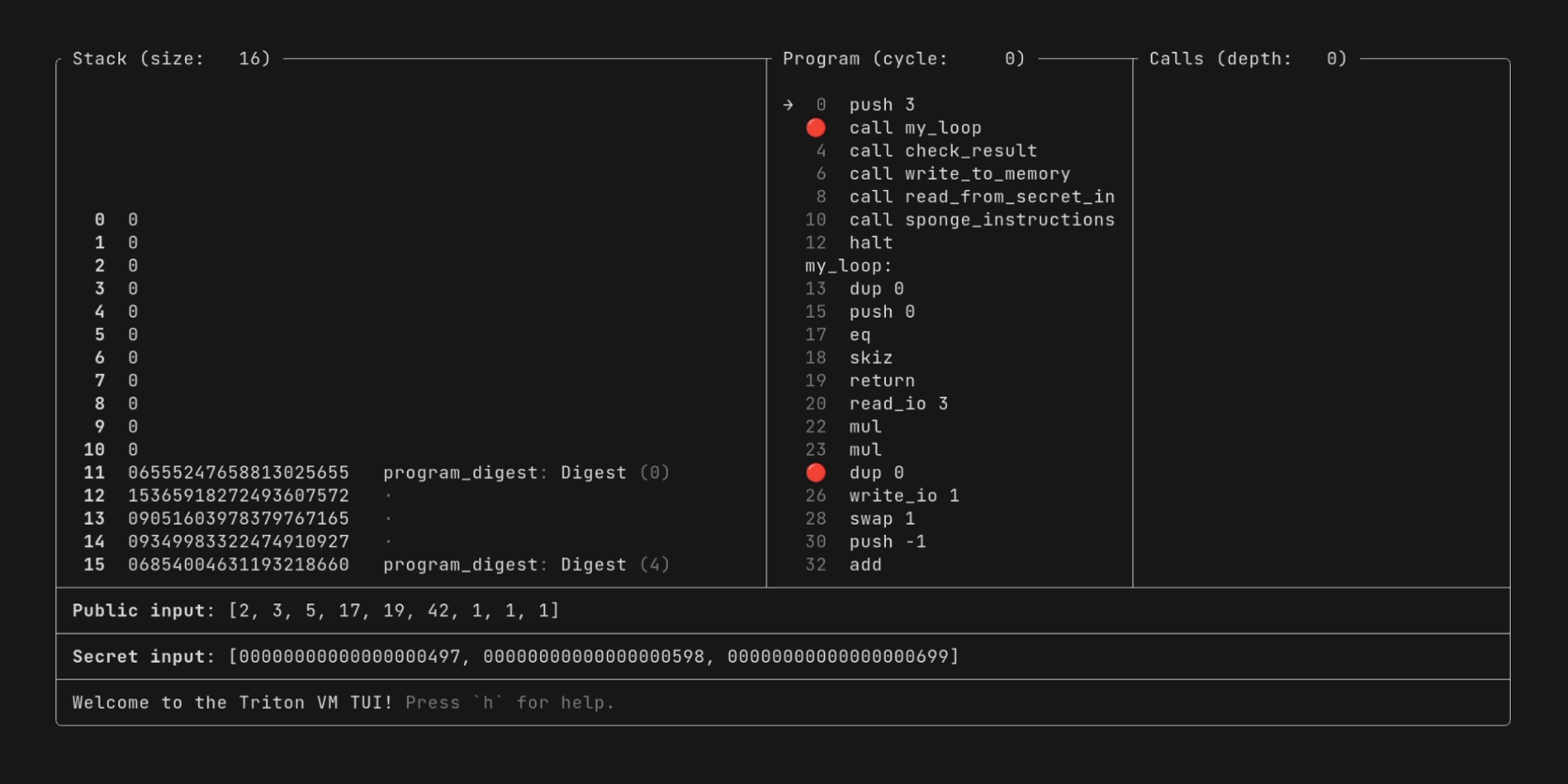
If you want to profile your program, generate proofs for it, or verify such a proof, then take a look at Triton CLI.
If you want to start developing bigger programs, check out tasm-lib, a Rust
library that provides re-usable Triton assembly snippets.
References
When writing Triton assembly, the most important reference is the already-mentioned comprehensive list of instructions.
If you want to take a deeper dive into Triton VM’s inner workings, take a look at the specification. You are now already familiar with many of the concepts, but in the specification, they are explained in greater detail and with a different focus.
Program Ideas
In case you just want to keep programming in Triton assembly, here are some additional program ideas:
- The Fibonacci sequence.
For example, you can write the first
nelements in the Fibonacci sequence to public output. Or you can write a program that only halts if the secret input is thenth element in the Fibonacci sequence. - A triangle verifier. Read three numbers from public input and verify they can be side lengths of a triangle. As a second step, make one side secret and verify that the hidden value from secret input still produces a valid triangle.
- A Sudoku verifier. As a first step, simply verify that a Sudoku from public input follows the rules. In a second step, have only some of the cell entries be public knowledge, and verify that the missing entries as filled from secret input are a valid solution.